Mobile DJs and bands
A different room every weekend. Set up, run the sweep, apply, play — and save the setup per venue to load it again next time.
PA system tuning · Windows, Mac & Linux
Put up a measurement mic, run a sweep: AURIX proposes EQ, crossover frequency, delay and polarity between subs and tops, and processes everything live on your laptop. You see the result and a confidence score before anything is applied.
No credit card. Full version. The clock starts when you first launch it.
Windows 10/11, macOS (Intel & Apple Silicon) and Linux · your existing audio interface · measurement mic required (not included)
Who this is for
A different room every weekend. Set up, run the sweep, apply, play — and save the setup per venue to load it again next time.
Align subs and tops, set the crossover, keep the level under a limit — with a laptop and an audio interface instead of a controller for every rig.
A fixed install that was never tuned. One evening with a measurement mic brings subs and tops together. There is a dedicated target curve for speech.
Mains, subs, front fills, delay lines: you put together what you have set up — from a template or from scratch.
Zones, floor plan and channel test have been part of AURIX since 1.7.
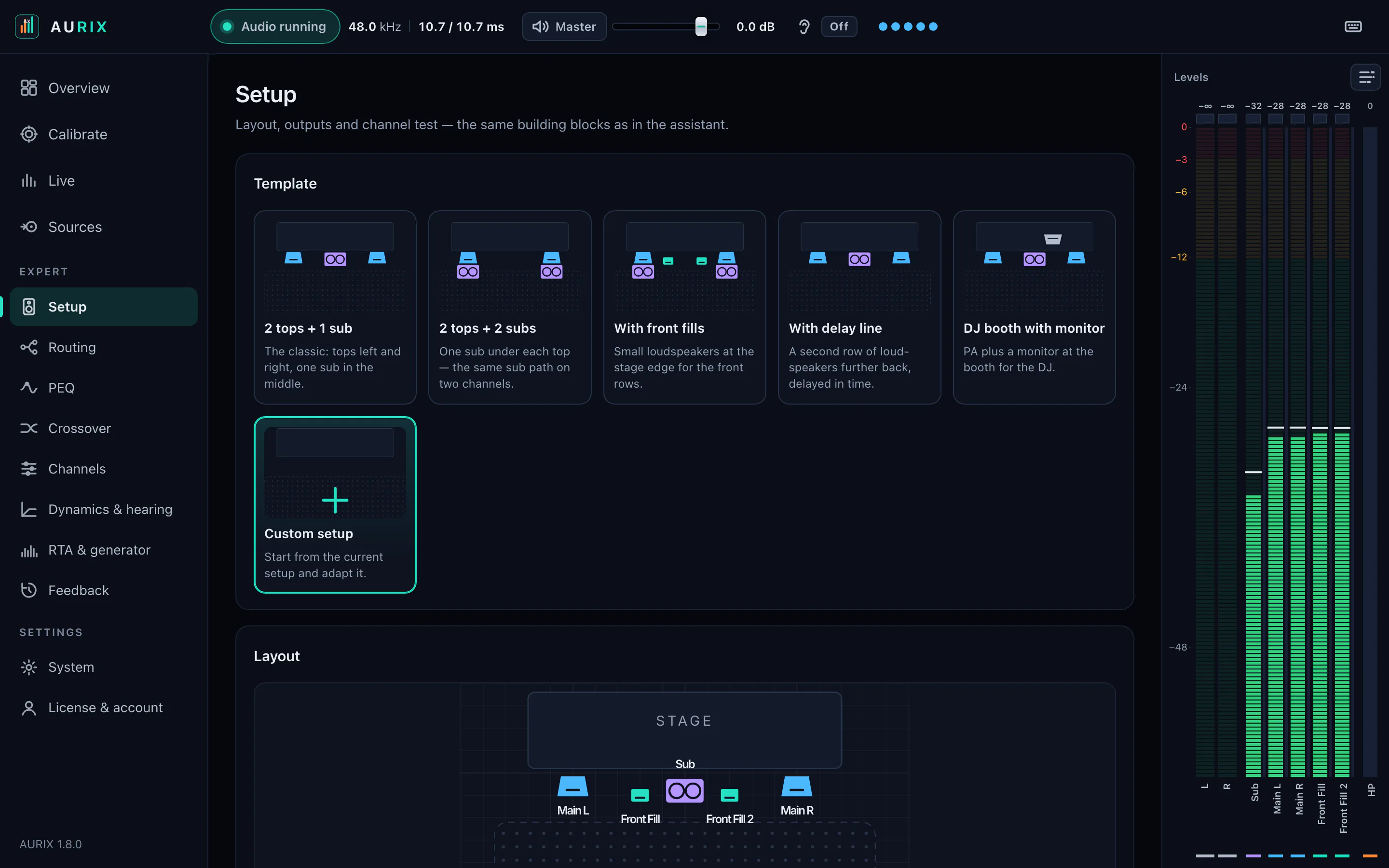
Setup
Templates for the usual rigs — from the classic two tops and a sub to a DJ booth with a monitor. Or start from scratch.
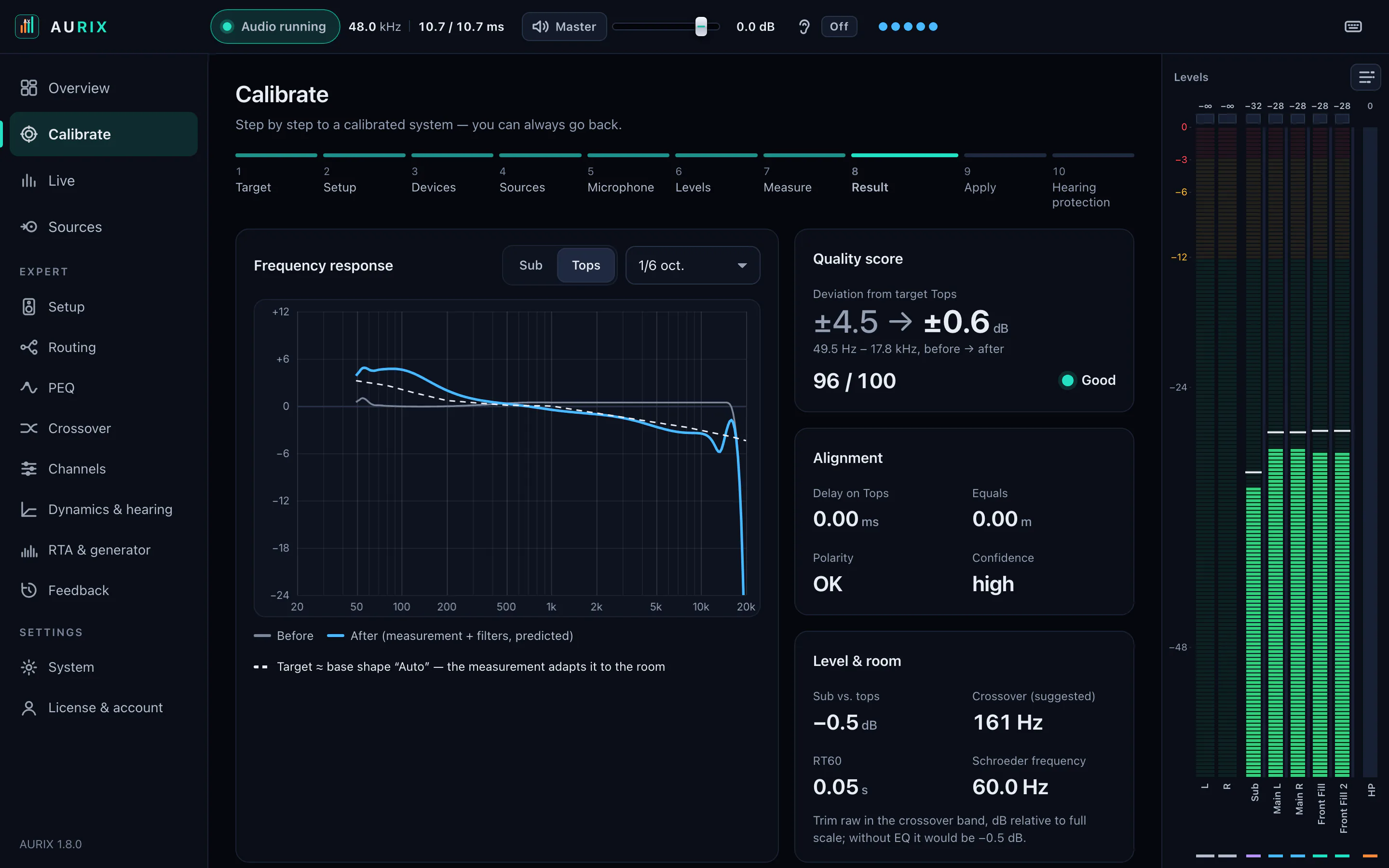
One sweep through the system is enough for AURIX to suggest what can be improved — and to show how much it helped.
An exponential sine sweep plays through the system while the measurement mic records.
AURIX deconvolves the recording into an impulse response. From it come frequency response, delay and RT60.
Suggestions for EQ, delay, polarity and crossover. You tick what gets applied.
How far the system deviates from the target before and after the correction.
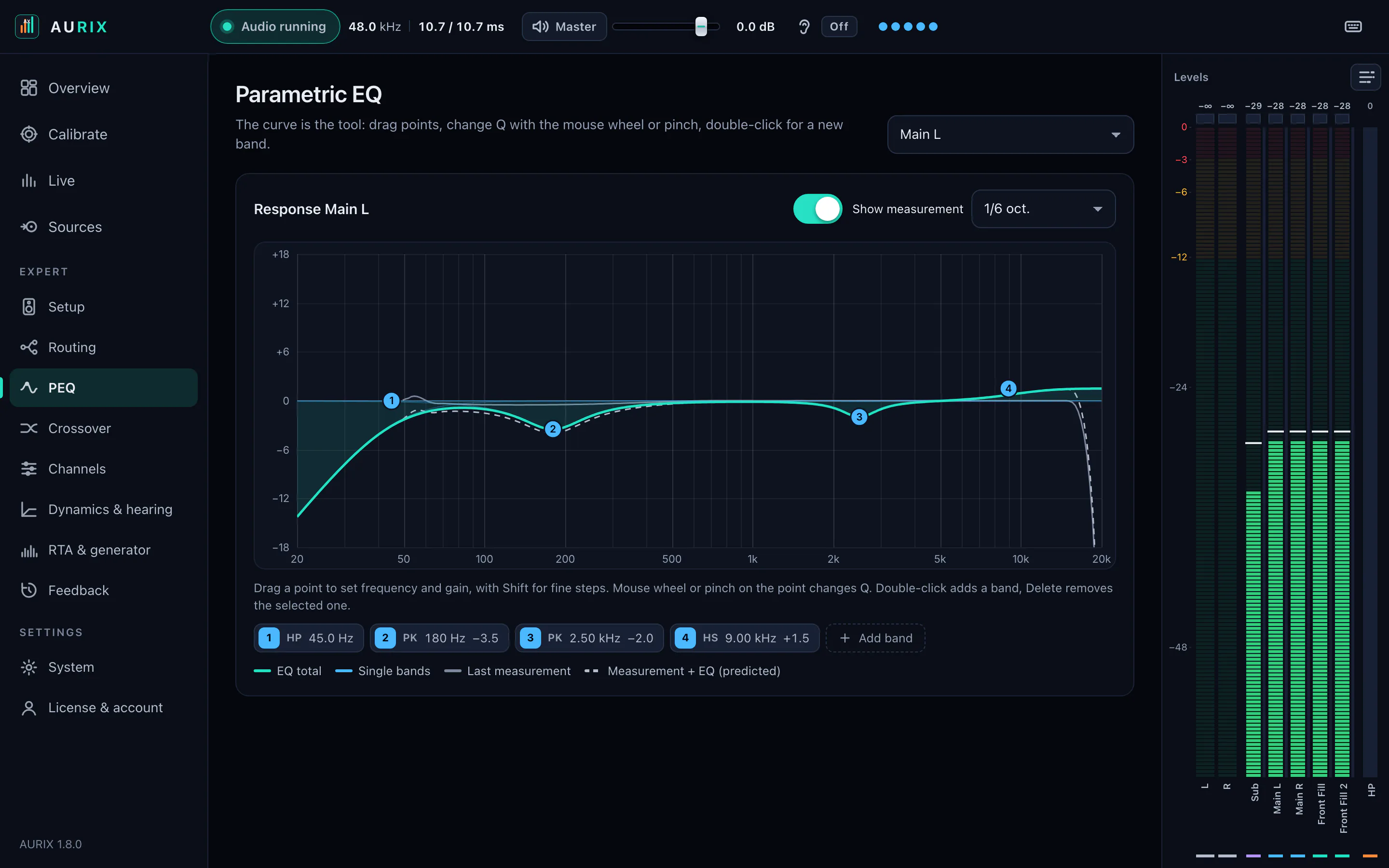
Values for the tops from the screenshot below, measured through a digital test loop.
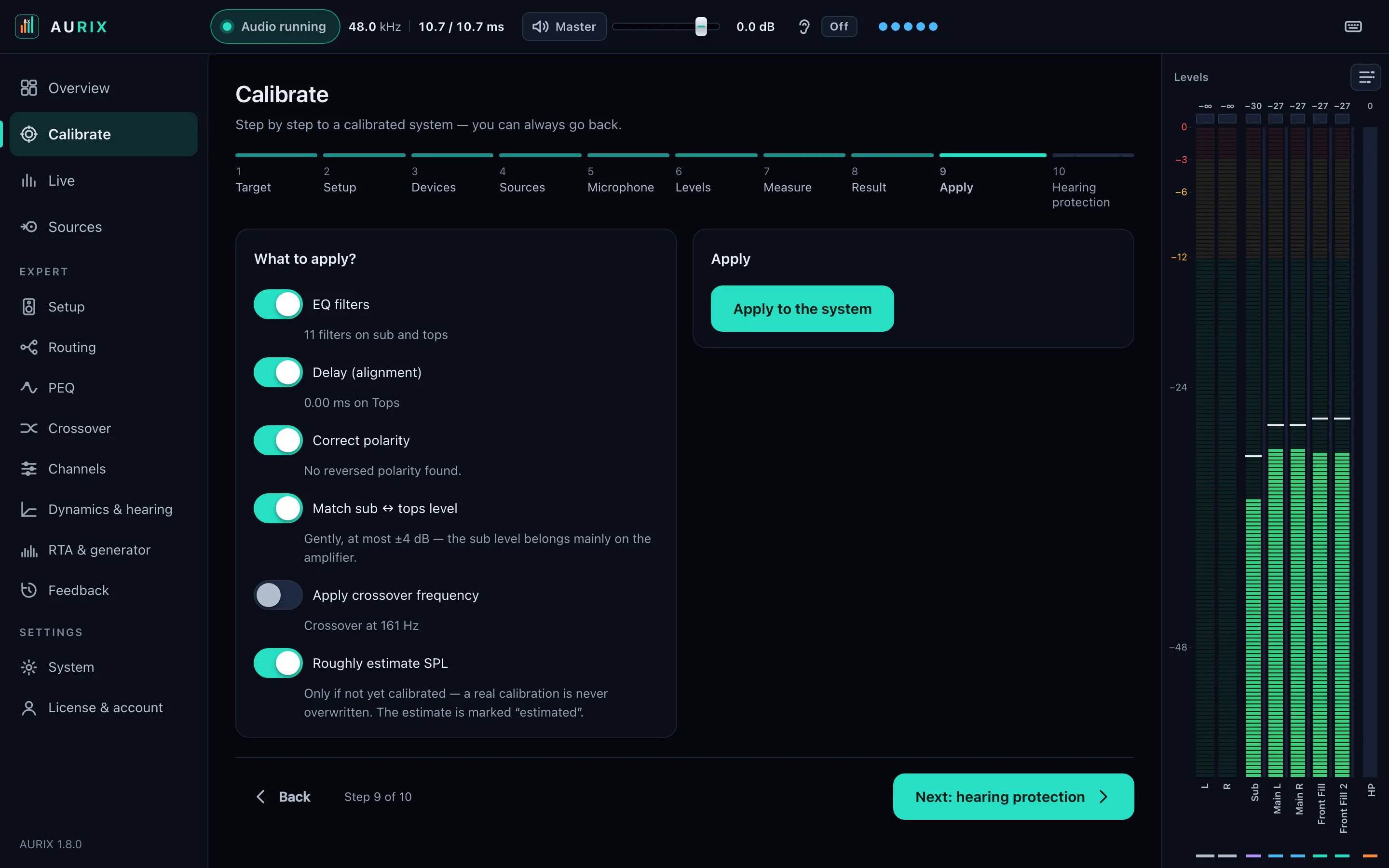
Apply
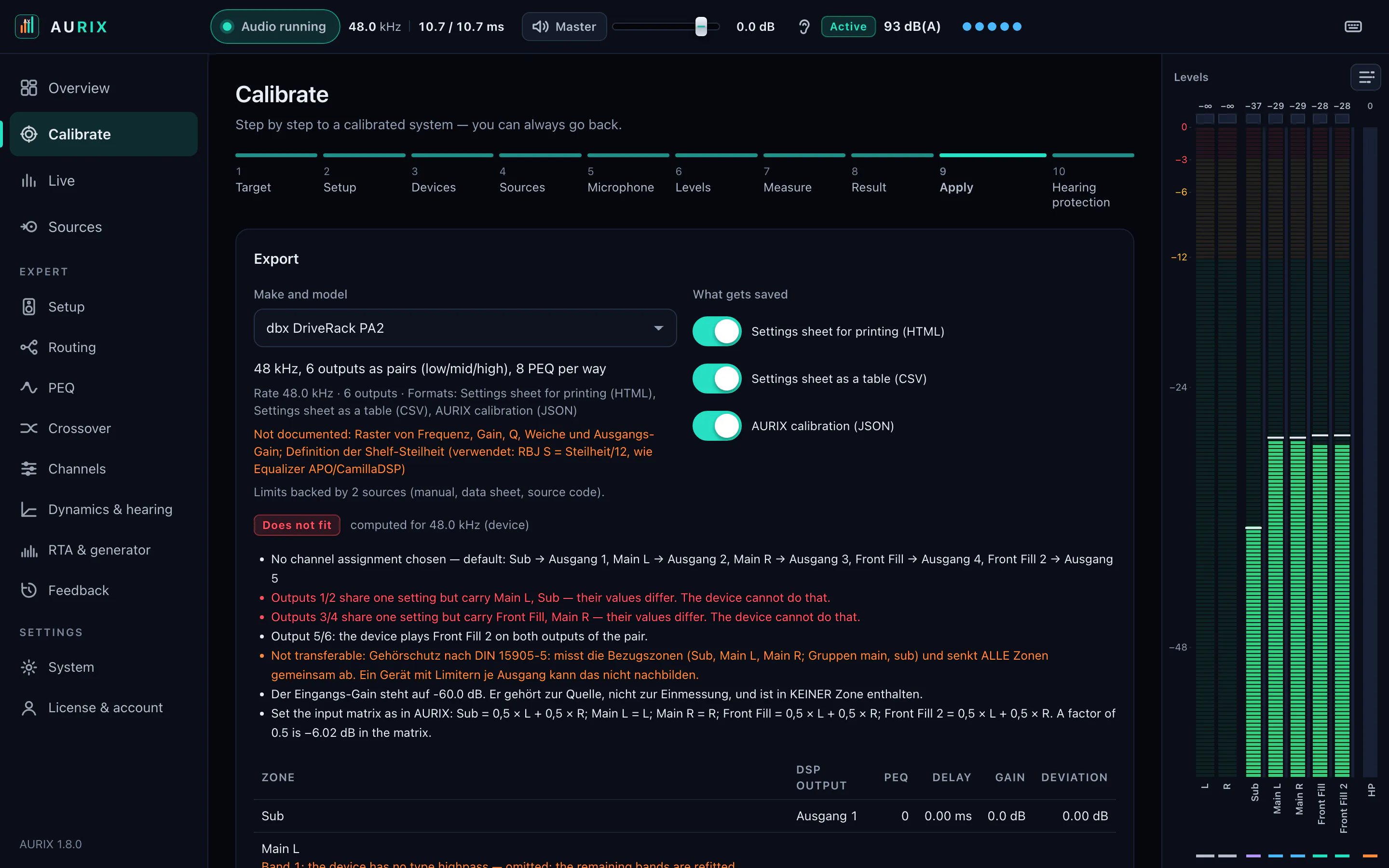
Every correction on its own: switch EQ, delay, polarity, level and crossover on or off — only what you apply goes to the system.
How it works
A measurement mic on your audio interface. Calibration for the Pioneer APM7008 is built in; other mics get their calibration file in REW format.
AURIX works its way up to the right measurement level, checks the signal-to-noise margin and measures subs and tops separately.
Measurement, target curve and response after EQ, plus delay, level, crossover, RT60 and the confidence score. Checkboxes decide what is applied.
Your audio runs through AURIX to the outputs of your interface. Save the setup per venue and load it again later.
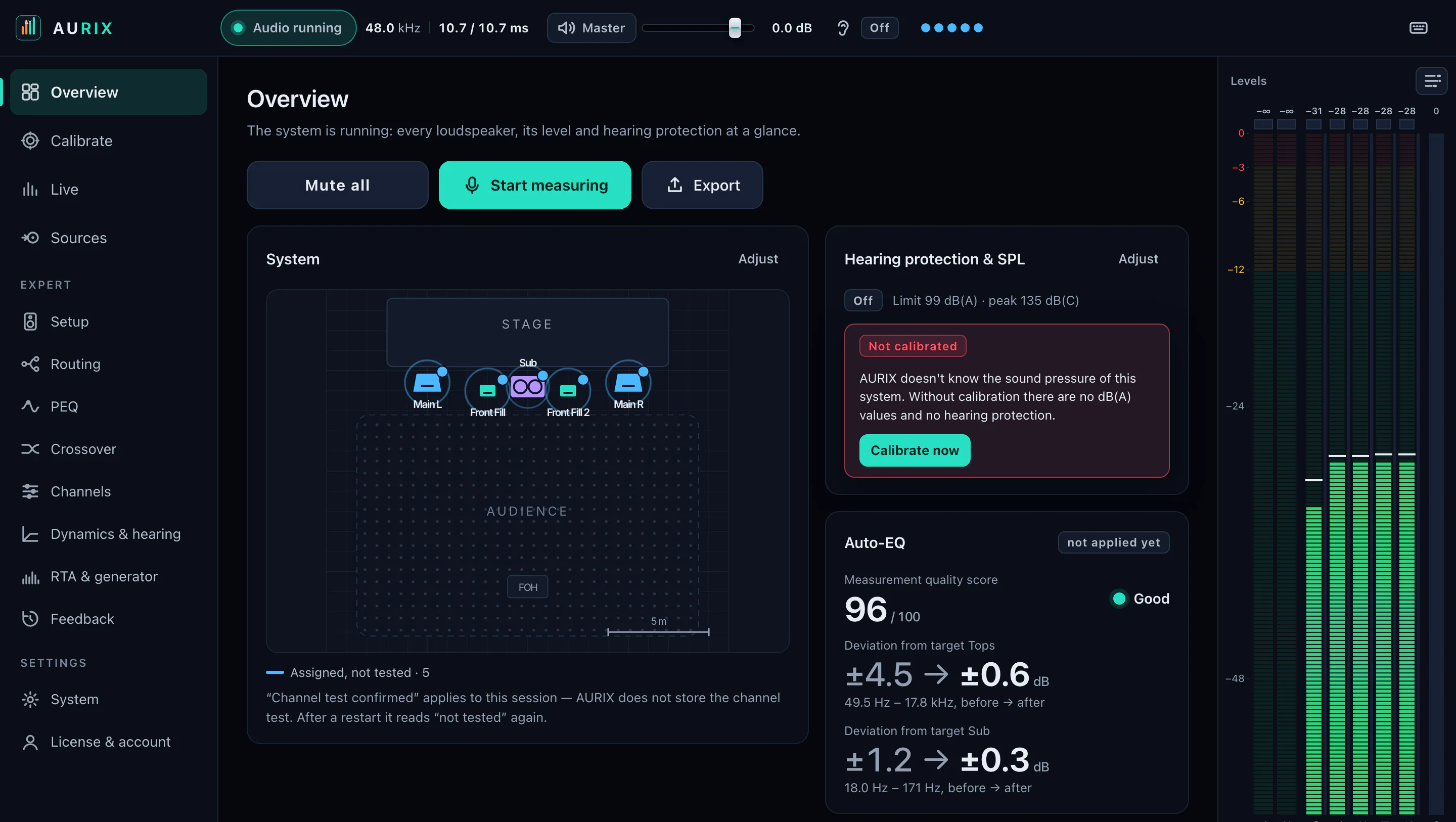
The overview: the system on its floor plan, hearing protection and sound pressure, the auto-EQ quality score — plus mute all, measure and export in one click.
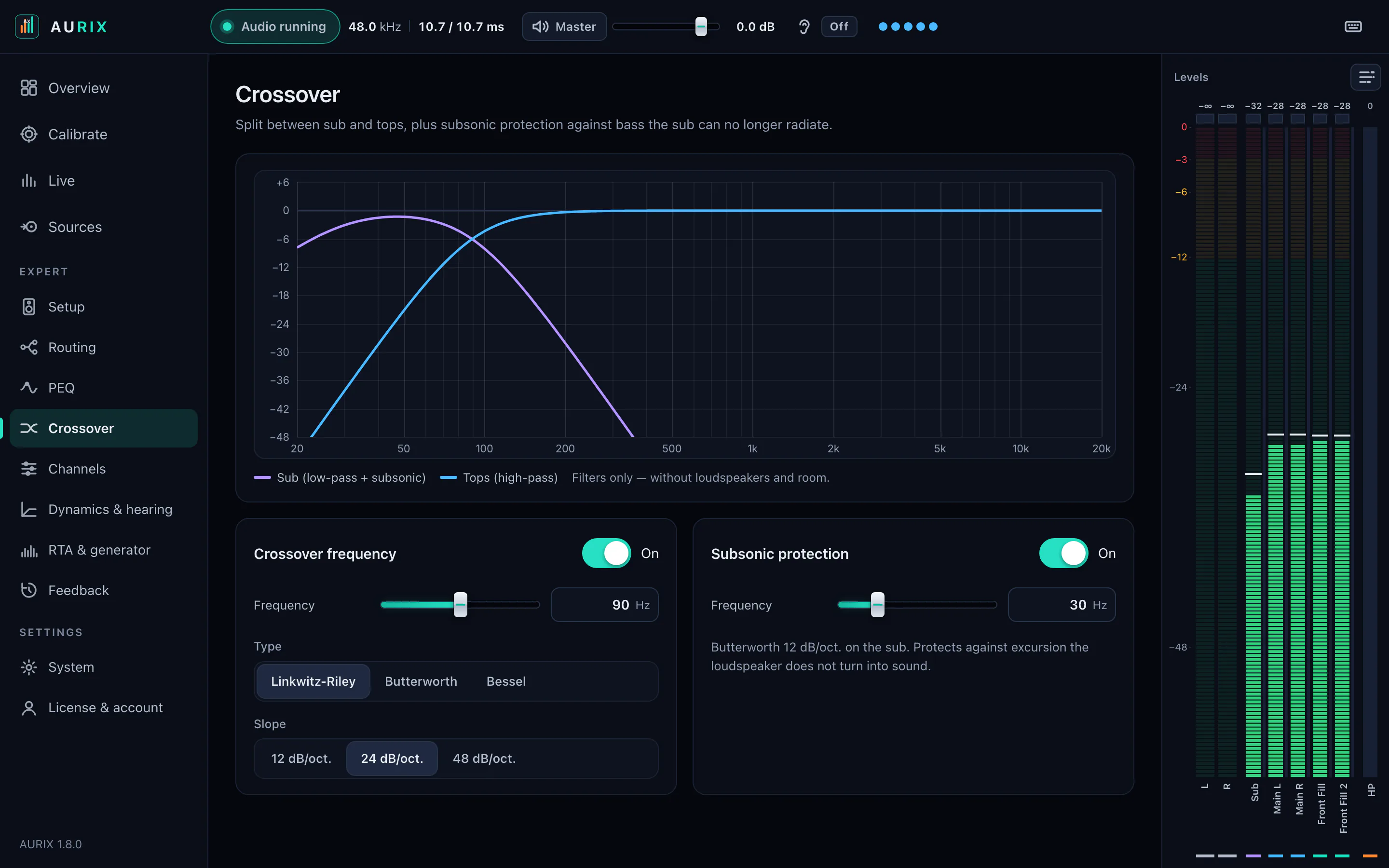
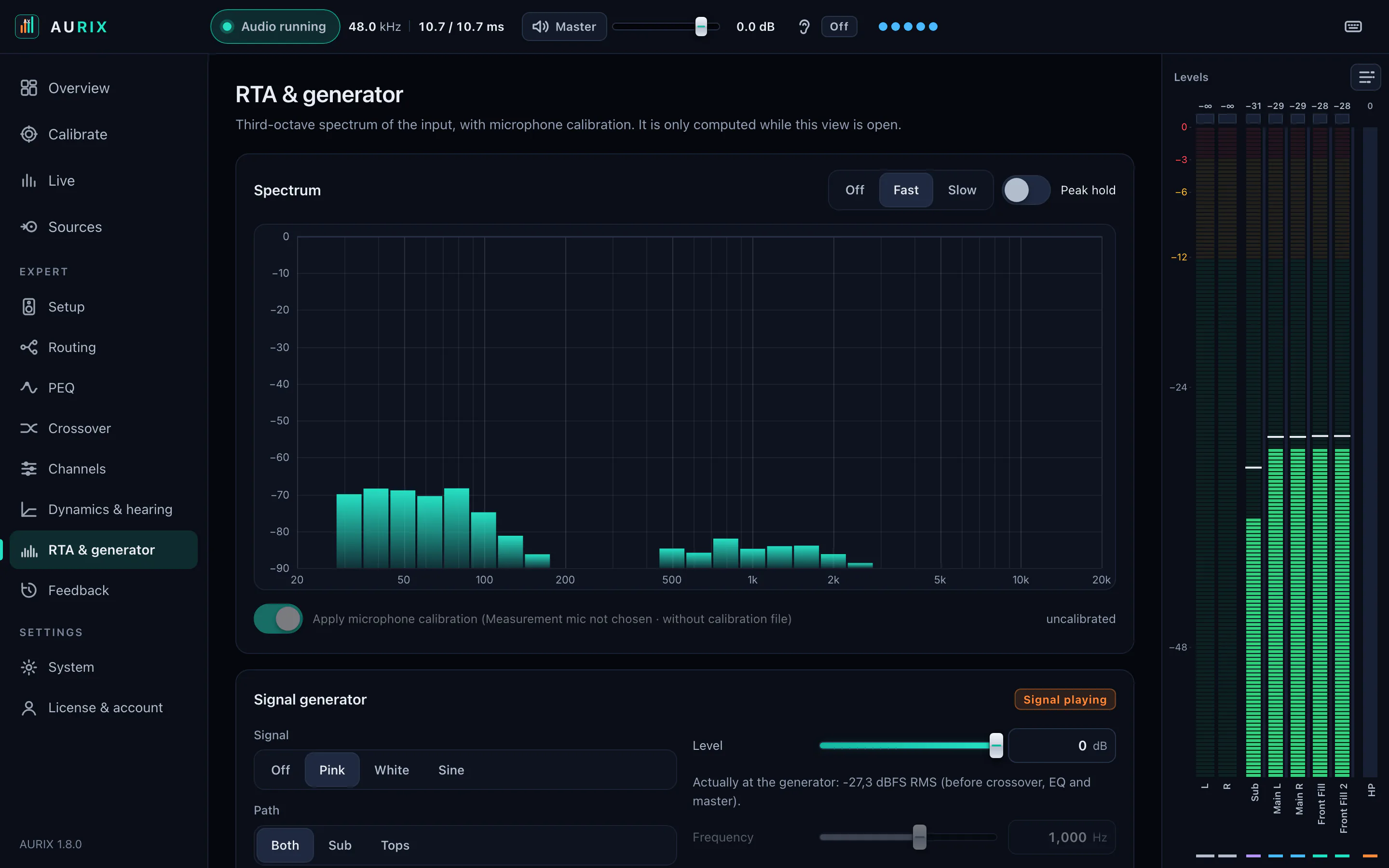
Screenshots from AURIX 1.8. The measurement for these screenshots ran through a digital test loop, not in a room.
What's inside
Every measurement gives you frequency response, delay and a confidence value. You tick off what gets applied.
An exponential sweep, deconvolved into an impulse response. That yields frequency response, arrival time and reverberation time (RT60) — and only the arrival time makes aligning subs and tops possible.
If AURIX does not trust the measurement, it refuses to apply it and names the reasons. You can only override that explicitly.
Delay in milliseconds by cross-correlation (GCC-PHAT) and automatic polarity detection — you apply both with a checkbox.
A dip caused by a second path cannot be filled with EQ. AURIX does not boost there; it tells you the path difference in metres and milliseconds.
Linkwitz-Riley, Butterworth or Bessel at 12 to 48 dB/oct, a subsonic filter for the sub and a limiter per output path.
Under System → Update, AURIX checks for new versions and installs them — with a verified checksum.
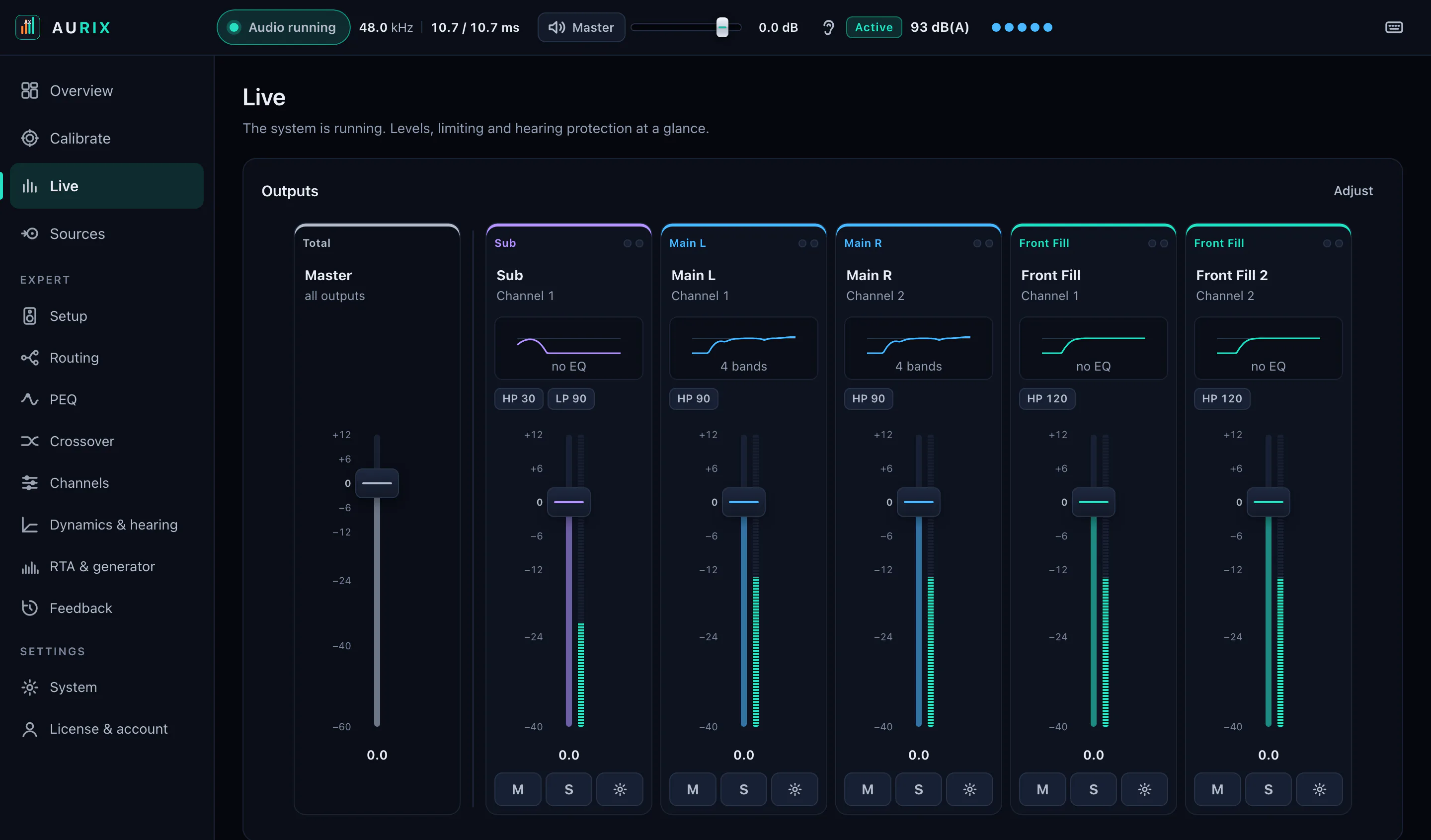
LiveNew in 1.8
Fader, meter, mute and solo for every speaker — just like on a system processor.
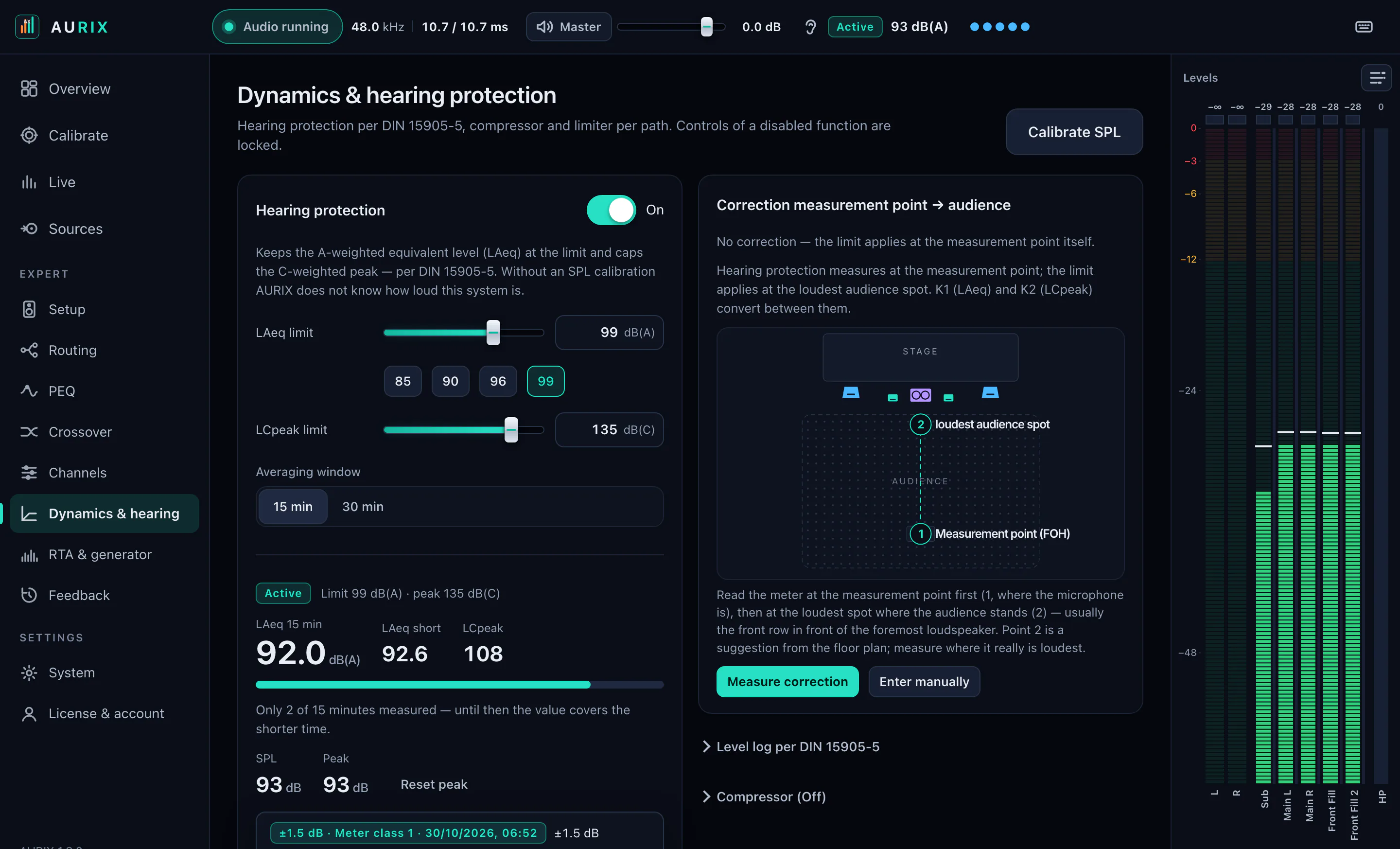
Hearing protection
Holds the A-weighted continuous sound level at the figure you set — even when someone else is at the desk.
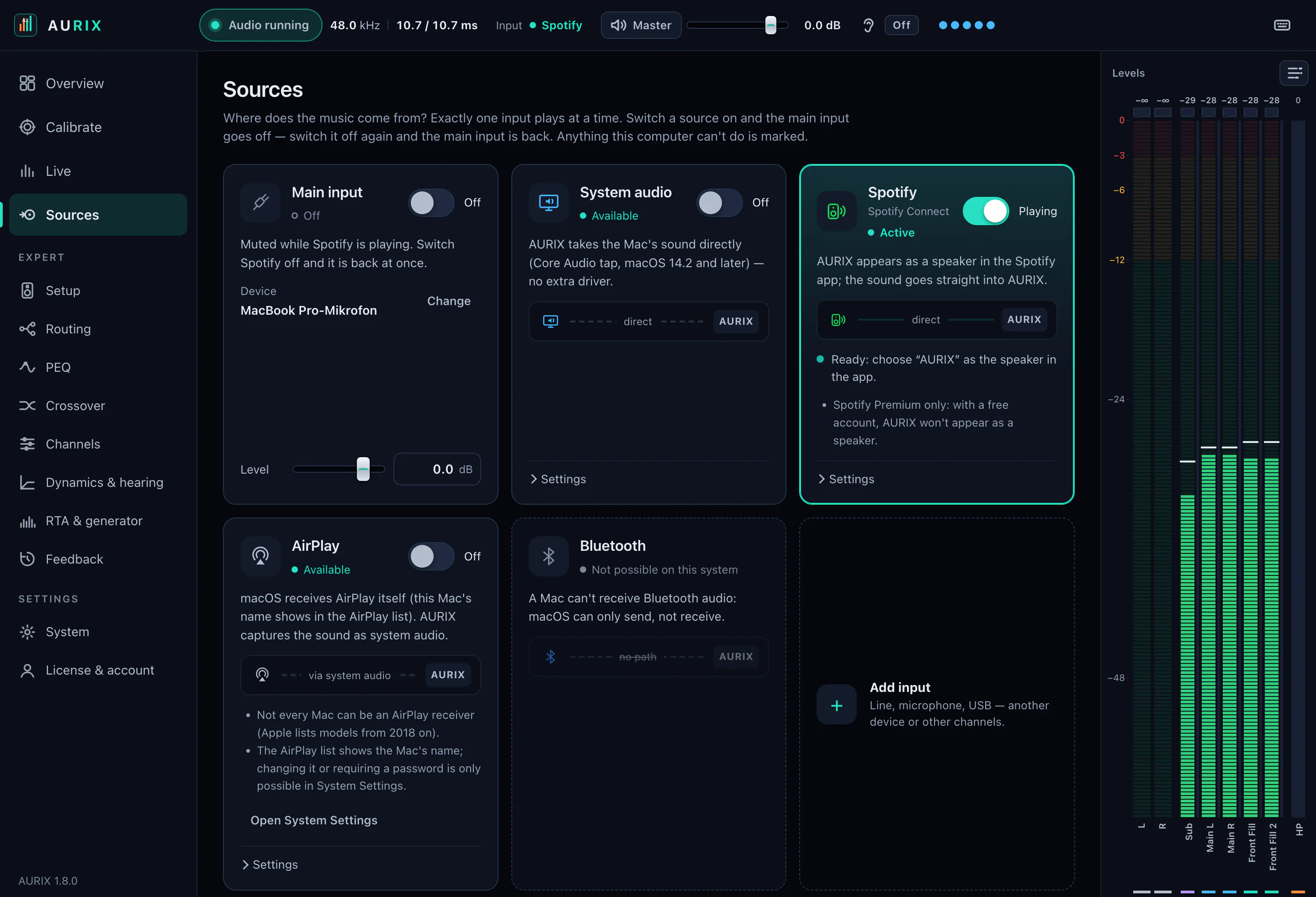
SourcesNew in 1.8
Music straight into the system — every source with its own name and its own level.
The same AURIX on Windows, macOS and Linux. One licence covers three devices.
Windows
10 and 11, 64-bit
macOS
11 or newer, Intel and Apple Silicon
Linux
x86_64 as AppImage, Ubuntu 22.04 or newer
On the screens: AURIX 1.8.
Compared with
The tools people actually buy for this job, with prices for orientation. The rows where AURIX loses are in the table too.
AURIX
€20once
Hardware processor
€120–600
Measurement suite + correction plug-in
≈ €800–900
| AURIX | Measurement suite + correction plug-in | Hardware processor | |
|---|---|---|---|
| Swept-sine measurement | Yes | Yes | Partly |
| Automatic sub/top time alignment | Yes | Manual | Manual |
| Confidence score that can refuse to correct | Yes | No | No |
| Crossover up to 48 dB/oct | Yes | No | Yes |
| Calibrated SPL meter | Yes | Yes | Partly |
| Calibrated maximum-level ceiling | Yes | No | Partly |
| Runs on macOS | Yes | Yes | Varies |
| Runs without a laptop in the signal path | No | No | Yes |
| Analog inputs and outputs of its own | No | No | Yes |
| Interface language | German, English | mostly English | Varies |
Ballpark figures for typical configurations, not quotes. If you only want to measure: REW is free — it measures and calculates filters, but does not process audio live.
The honest part
Everyone who has tuned a system has seen auto-EQ make things worse. Here is what AURIX does about each of the usual failure modes — and where it cannot help.
Fair. AURIX detects cancellations caused by a second path, does not boost there and tells you the path difference. And if the measurement is uncertain, it refuses to apply it.
True. AURIX measures at one position — put the mic where the audience stands, then check the result with the RTA at a second spot.
No. AURIX proposes, you decide: checkboxes choose what is applied — and afterwards every filter can be switched off or edited by hand.
AURIX runs your audio through your interface. If the computer dies, there is silence — as with any computer in the signal path. For critical shows, keep a hardware path alongside.
Check it. Measure the same rig in REW or Smaart and compare — every parameter is on screen.
Then AURIX refuses to apply and names the reasons. You can still apply explicitly — or measure again.
Measure the same system in REW or Smaart and compare our result. If it disagrees, tell us — that is the most useful message you can send.
Three things — you probably own two of them already.
Measurement mic — required, not included
Any measurement microphone. Profiles for miniDSP UMIK-1/-2, Behringer ECM8000, Dayton EMM-6 and Pioneer APM7008 are built in; any other calibration file in REW format works too.
For example
Your existing audio interface
Audio runs through AURIX to its outputs — at least two, for subs and tops. Ideally all outputs on one device: one clock, nothing drifts apart.
For example
Windows 10 or 11 (64-bit), macOS 11+ (Intel & Apple Silicon) or Linux (x86_64, AppImage)
No special hardware needed.
These are plain Amazon searches with no affiliate program — we earn nothing from them. Any comparable device works.
Pricing
All updates included. No subscription, no dongle, no online requirement — AURIX starts without a connection.
€20once
perpetual licence · 3 activations · updates included
Try free for 7 daysOr buy right away€20oncePay with
Apple Pay · Google Pay · Link · Card (Visa, Mastercard, Amex) · Klarna · Amazon Pay · Revolut Pay
Depending on your country also EPS, Bancontact, BLIK, MobilePay, Multibanco, MB WAY and Satispay.
30-day money-back guarantee — write to us and you get a refund, no questions asked.
The statutory right of withdrawal for digital goods lapses once the download begins. The guarantee above is ours, given voluntarily, and applies regardless.
Who is behind this
AURIX is made in Germany by Tim Luis Techert — someone who tunes PA systems himself. Every version is listed openly with its changes.
Knowledge
What goes wrong when tuning a PA and why — explained without sales talk, useful even without AURIX.
Feedback is not bad luck, it is a loop with gain. Which lever buys how many decibels — ordered by effect, not by effort.
ReadFive steps, ordered by their effect in decibels: tops, subs, timing, target curve, equaliser. Why the equaliser comes last — and how to measure so the measurement holds up.
ReadIn a reverberant room, more level does not make speech clearer, it makes it worse. Why that is, and which four measures actually work.
ReadThe corner gives you level and takes away evenness. Two subs left and right lay a striped pattern across the audience. Changing either costs nothing.
ReadA deep, narrow notch in the response cannot be equalised away. Why that is, how to recognise it, and what actually helps instead.
ReadThe crossover region sounds thin, the kick has no punch. Why measuring distances is not enough, what counts instead, and how to verify the result.
ReadA microphone with a known deviation beats a flat one without. What a measurement mic has to do, what you can skip, and what happens without calibration.
Read"100 dB" can be a peak or a half-hour average — with music there are about 17 dB between them. The two quantities that actually matter, and why any limit without a measurement is a guess.
Read80 Hz is a home-cinema convention, not a PA rule. What really sets the crossover, why crossing higher demands tighter time alignment, and how to verify your choice.
ReadA measurement mic, an audio interface and a computer. We supply none of them.
To process audio, yes. The signal comes in through your interface — or, if you want to process the computer's own audio, through a virtual audio device (Windows: VB-CABLE, macOS: BlackHole) that AURIX points you to. Measuring alone works too; you then transfer the values to your rack by hand.
Three activations per licence. You can release a device in your account at any time, so replacing a laptop is not a problem.
The software then asks for a licence again. Your measurements, filters and setups stay on your computer — after you buy, everything is right where you left it.
Only for activation. After that the licence is verified locally, so the software keeps working without a connection and checks in when it can.
Yes. AURIX runs on Windows and on macOS 11 or newer — on Intel Macs and, since version 1.6.2, as a native build for Apple Silicon (M1 and newer). Both Mac builds are listed separately in your account. The licence covers both systems and you can spread your three devices freely. One thing up front: the Mac build is not registered with Apple, so macOS asks once on first launch (right-click → Open). The interface is available in German and English on every system. Since version 1.6.4 there is also a Linux build (AppImage for x86_64, Ubuntu 22.04 or glibc 2.35 and newer).
Yes, 30 days, no questions asked. One message is enough.
No, and we do not claim it does. AURIX holds the A-weighted continuous level at the figure you set, caps the C-weighted peak and shows both over 15 or 30 minutes. Regulations such as DIN 15905-5 additionally require a Leq log and a sealed limiter from an approved body — AURIX replaces neither. Nor is it a certified measuring instrument.
Seven days, the full version, no card. If the result does not convince you, you have lost nothing but an evening — and you will know more about your PA than you did before.
Turning the system clock back does not extend the trial — AURIX then asks for the correct time, and at the next sign-in the server's clock counts.
Windows 10/11 and macOS (Intel & Apple Silicon) · updates included